
Table of Contents
- Shopify Search and Discovery
- Shopify Search & Discovery
- How Shopify Search & Discovery Works
- Set Up Shopify Search & Discovery
- How to Use Shopify Search & Discovery
- Benefits of Using Shopify Search & Discovery
- Limitations of Shopify Search & Discovery
- Shopify Search & Discovery vs Advanced Search Needs
- Expertrec Smart Search Bar
- Shopify Search & Discovery vs Expertrec
- Conclusion
In a physical store, a salesperson helps customers find what they’re looking for regularly. In an online store, search and find that role. When shoppers can quickly discover the right products, they buy more. When they can’t, they leave the site and search for other good websites.
For Shopify customers, product discovery becomes even more important as collections grow. A store with 20 products might be easy to browse, but a store with 500 or 5,000 products needs smarter tools to guide customers.
To address this, Shopify introduced the Shopify Search & Discovery app, a free system app designed to improve how customers search, browse, and find products within a Shopify store. It gives customers basic controls over search results, filters, and product recommendations.
SHOPIFY SEARCH & DISCOVERY:
The Shopify Search & Discovery app is a free app built by Shopify to enhance its default website search and navigation experience. Rather than replacing Shopify’s core search engine, it adds layers of control to pull customers that how products appear and how customers browse collections.
Shopify introduced this app to give merchants more flexibility without requiring technical knowledge or paid tools. Before this app, many basic search customizations were unavailable or required third party apps that affect your privacy by stealing your personal data. The app works closely with their native search collections and storefront filters. Product recommendation blocks across product pages and collections.
For example, a clothing store owner can promote new arrivals in search results, add filters like size and colour, and show offer sale items such as belts with trousers to promote their new arrivals.
However, it’s important to understand one thing clearly: Shopify search & discovery enhances search that it doesn’t replace it. The core logic of Shopify’s search engine remains the same.
HOW SHOPIFY SEARCH & DISCOVERY WORKS:
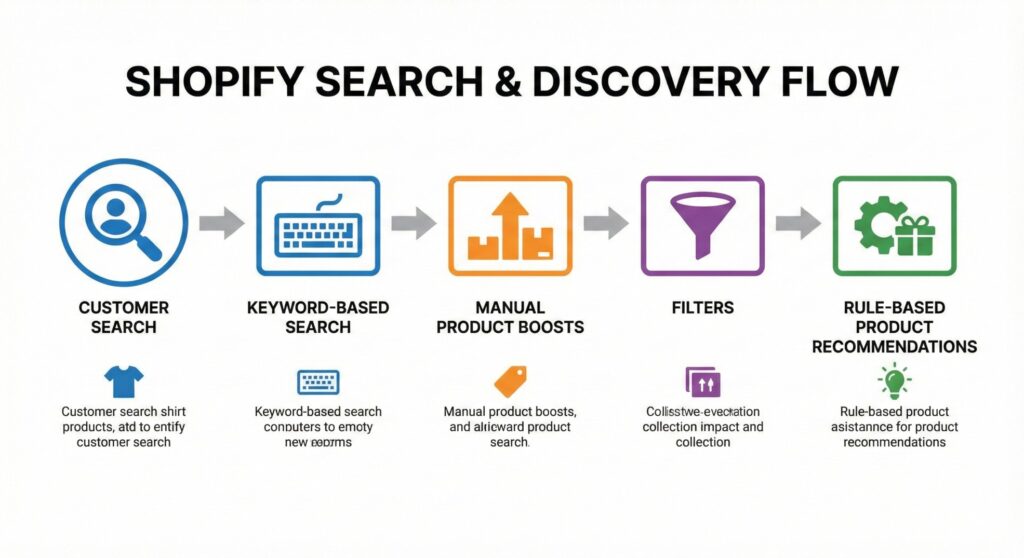
At a high level, Shopify Search & Discovery helps merchants guide search and browsing rather than automatic engines
Search result customization:
Merchants can manually pull customers which products appear higher or lower for specific search queries. For example, if shoppers search for “party dresses” a merchant can boost bestselling or high margin dresses for that term
Filters and faceted navigation:
- Price
- Availability
- Product type
- Variants
- Custom fields
Product recommendations:
Shopify Search & Discovery also enables relatable and complementary product recommendations. These are rule based suggestions, such as showing socks with shoes or phone cases with mobile phones.
Think of the app as a manual control panel, it improves clarity and structure, but it doesn’t think like a shopper or adapt automatically to their behaviour.
SET UP SHOPIFY SEARCH & DISCOVERY:
Step 1: Install the app from Play store or App Store.
Step 2: Access from Shopify Admin
Step 3: Review products and collections
Step 4: Set up filters
Step 5: Customize search results
Step 6: Enable recommendations
Most merchants can complete the setup in under an hour, making it ideal for stores without specialized technical teams.
HOW TO USE SHOPIFY SEARCH & DISCOVERY:
Merchants can manually boost specific products for key search terms, reduce seasonal or low stock items to increase the price and gain profit, hide products that shouldn’t appear for certain queries.
Filter Navigation help shoppers browse faster.
Product Recommendations are rule based, not behaviour based.
BENEFITS OF USING SHOPIFY SEARCH & DISCOVERY:
- It’s free and built by Shopify where it’s easy for beginners and non-technical teams.
- Improves search and product visibility where to give basic control over search and recommendations.
LIMITATIONS OF SHOPIFY SEARCH & DISCOVERY:
- No AI or semantic search
- Limited error handling
- Manual rules don’t scale
- Minimal search analytics
SHOPIFY SEARCH & DISCOVERY VS ADVANCED SEARCH NEEDS:
This is where advanced Shopify search apps come into play.
EXPERTREC SMART SEARCH BAR:
Expertrec Smart Search Bar offers a powerful upgrade.
You can explore it here:
https://apps.shopify.com/expertrec-smart-search-bar

AI-powered site search with instant autocomplete
Deliver lightning-fast search experiences with ExpertRec
ExpertRec helps you implement intelligent autocomplete, typo-tolerant search, personalized results, and scalable server-side search — all without complex infrastructure or heavy development effort.
Quick setup • No coding required • Works on any website
SHOPIFY SEARCH & DISCOVERY VS EXPERTREC
| Features | The Shopify Search & Discovery | Expertrec |
|---|---|---|
| Search Engine | Basic keyword-based search | AI-Powered semantic search |
| Error Handling | Basic | Advanced autocorrect & synonyms |
| Merchandising | Manual rules | AI-Automated ranking |
| Analytics | Basic | Deep insights |
| Price | Free | Paid (Free tier available) |
CONCLUSION:
Choose Shopify Search & Discovery, for small stores that need a free, simple way to organize their catalogue.
Choose Expertrec, for growing or large stores where you want AI to automate the work, handle complex customer queries, and push higher conversions.