

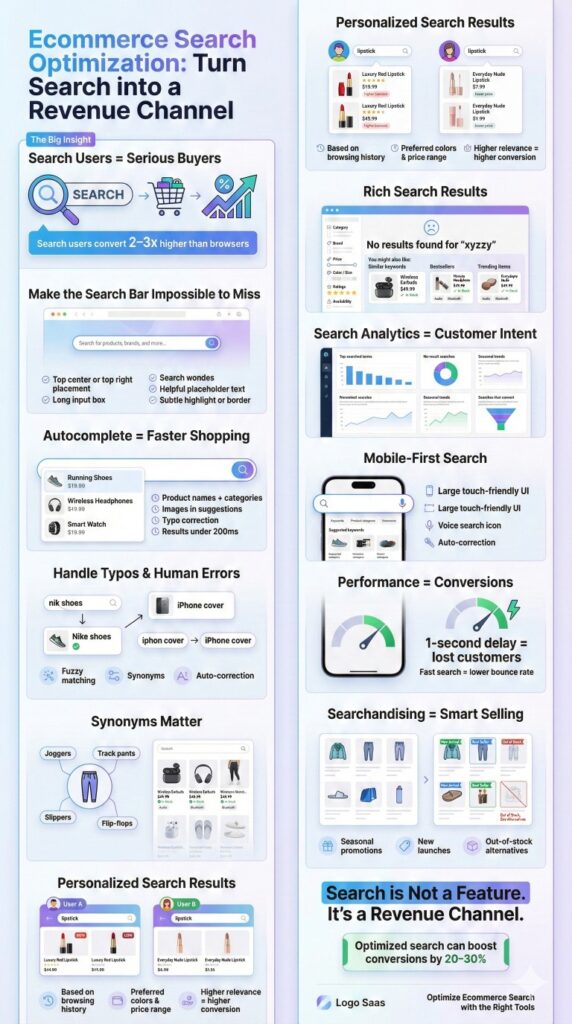
If you run an ecommerce store, you already know one simple truth — people who use your search bar are your serious buyers. They know what they want. But here’s the twist: most online stores still treat search like a side feature instead of the revenue-driving machine it is.
Make the Search Bar Impossible to Miss
Many online retailers still make their search function feature at the bottom of a small icon with a magnifying glass or place it at a location where it is hardly noticed by consumers. That is a tremendous blunder. Those who search convert at a rate of 2-3 times more than ordinary browsers.
Best practices
- Place it at the top centre or top right of your header.
- Keep the box long enough to type full product names.
- Provide placeholder text such as “Search dresses, shoes, bags…” to indicate what to search for.
- A bright border or a gentle highlight can be used so it draws attention.
With Expertrec, Brands often see an increase in user engagement just by making the search box bigger and more visible.
Offer Autocomplete
When we search on google, and suggestions start flying instantly. Your online shop must provide a similar service to its customers. The function of showing suggestions in real-time is referred to as autocomplete. It reduces effort, removes guesswork, and guides shoppers to relevant products faster.
Best practices
- Make product names, categories, and hot searches show up.
- Add product images wherever applicable.
- Ensure that results do not take more than 200ms. Anything longer than that annoys users.
- Automatically correct spelling errors
Expertrec’s autocomplete is built for speed — even stores with millions of SKUs get instant, typo-friendly suggestions.
Support Spelling Mistakes and Human Errors
More than 20% of ecommerce searches contain a typo. Imagine someone typing “nik shoes,” “iphon 14 cover”, or “blu tooth eraphones”. If your search system is not capable of recognizing these errors, your visitor is going to see “No products found” and they leave the site.
Best practices
- Correct the mistake automatically
- Identify synonyms
- Use fuzzy matching (so “Bluetooth” and “blue tooth” will both work)
Expertrec’s AI model is constructed around these signs of day-to-day life mistakes. There are no complex setups – it simply gets what the user meant to say.
Use of Synonyms (Because Buyers Think Differently than You)
The product may be listed as “joggers” but the customers might search for track pants, gym pants, running pants, yoga bottoms. If your site doesn’t connect the dots, you are losing sales just because the words don’t match.
Best practices
- Create a synonym list for common variations
- Consider regional differences (e.g., slippers vs. flip-flops)
- Map brand-specific terms to common ones
- Update synonym lists during festive events like Diwali, Black Friday, etc.
On Expertrec, you will manage synonyms in a few seconds using an easy visual interface—no coding, no technical hassle involved.
Personalize Search Results for Better Conversions
Ecommerce search shouldn’t be one-size-fits-all. The need for personalization is justified when two customers search for “lipstick” and want completely diverse things.
Best practices
- Show products based on past views
- Set a price range according to user’s browsing
- Show colours or styles that user clicks on most
It is not bothering — it is accessibility. Personalization removes irrelevant and helps customers find the right product much faster.
Expertrec that automatically changes the order of the search results. This method feels very natural, and users are very satisfied with it.
Use Smart Filters and Sorting
If you have a big range of products, filters are essential. However, if the filters are not properly designed, they will frustrate the users.
Best practices
Good search filters should include:
- Category
- Brand
- Price range
- Colour / size
- Material
- Ratings
- Availability
With Expertrec, modifying filter behavior is possible without altering your code at all.
Use Rich Search Results
People respond better to visuals. Your search should reflect that. Product images should be showcased in the suggestion box. If possible, also include price and stock information.
Best practices
Offer category shortcuts like:
- “Shoes → Running Shoes”
- “Shoes → Formal Shoes”
- “Shoes → Sneakers”
This facilitates the customers to reach the right place directly.
Expertrec’s rich autocomplete is specifically designed for this — it is clear, quick, and visually well-suited for ecommerce.
Always Handle Zero-Results Pages Gracefully
“No results found” is the most terrible message in ecommerce. It practically signals up the customers to leave and go shop elsewhere. Instead of a dead-end, smartly use this opportunity.
Best practices
- Suggestions for similar keywords
- Show bestsellers
- Show categories they can browse
- A soft message like “We couldn’t find that, but here’s what’s trending”
Expertrec allows you to have complete control over the zero-result behavior so that you never miss a customer because of one wrong keyword.
Search Data Analysis
Your search analytics are a free source of customer intent data.
Best practices
- Show the most searched terms
- Show the searches that cause purchases
- Show the searches that give no result
- Show the trending items
- Show the peak of keywords according to seasons
This is the type of information that brands very often invest thousands in obtaining — but you have it already.
Through Expertrec’s dashboard, you can identify and respond to such patterns with ease. The wise brands are drawing upon search analytics as their invisible growth tool.
Searching Must Be Mobile-Friendly
Currently over 70% of the traffic to ecommerce websites is from mobile devices. Your search on mobile must be very easy.
Best practices
- A clearly visible search icon
- Full screen search experience
- Large touch-friendly suggestion
- Automatic correction for misspellings
- Voice search if possible
The search UI of Expertrec is fully optimized for shoppers who prefer a mobile-first approach.

AI-powered site search with instant autocomplete
Deliver lightning-fast search experiences with ExpertRec
ExpertRec helps you implement intelligent autocomplete, typo-tolerant search, personalized results, and scalable server-side search — all without complex infrastructure or heavy development effort.
Quick setup • No coding required • Works on any website
Performance
Even a one-second delay ruins the search experience. Speed might seem like a small detail, but it has a huge impact on how people behave on your site. When results load quickly and smoothly, customers stick around, explore more, lead to higher conversions. If not, people usually give up and leave, which pushes your bounce rate up.
Best practices
- Use a dedicated search engine
- Optimize your product index
- Enable caching for frequent searches
Expertrec uses a globally distributed cloud search engine that ensures search results load instantly, no matter how large your catalog is.
Add Searchandising
Relevance is not the only factor in search; it is also a very effective marketing tool. Searchandising makes it possible for you to smoothly influence buyers while at the same time providing them with what they desire.
Best practices
- Do seasonal promotions
- Highlight new products
- Show alternatives when items are out of stock
- Personalized suggestions
With Expertrec, you can visually rearrange which products appear first for any keyword. You don’t need to change any line of code, and you don’t need a developer.
Conclusion
Search is not a feature; it’s a Revenue Channel. If your ecommerce site search is weak, customers won’t complain. They will leave the website. But when search is strong, fast, intuitive, typo-proof, and personalized – shoppers buy more, spend more time on your site, and return more often. At Expertrec, we’ve seen brands increase conversions by 20–30% within weeks simply by fixing their search experience. Expertrec’s no-code search engine makes it easy for any ecommerce business.


